Categories
Uncategorized

Unlock New Levels of Productivity with Click IT’s Managed IT Solutions!

Unlock New Levels of Productivity with Click IT’s Managed IT Solutions!
Click IT Logo

Unlock New Levels of Productivity with Click IT’s Managed IT Solutions!

As businesses evolve in this digital age, staying ahead of technology challenges is crucial. This week, we’re excited to showcase how our managed IT solutions can streamline your operations and boost your productivity.

  1. Feature Spotlight: MSP – Contracted Managed Solutions Dive into our proactive IT management services. Discover how Click IT MSP can alleviate your tech worries with comprehensive support that adapts to your business needs, all for a flat monthly fee.

  2. Client Success Story: Read about how we helped Furniture Concepts overcome their recurring network issues, resulting in a 30% increase in operational efficiency and significantly reduced downtime.

  3. Expert Advice: Cybersecurity in 2024 Get valuable insights from our security experts on the latest cybersecurity threats and best practices to protect your business data.

  4. Exclusive Offer for Subscribers: This month, take advantage of a special discount on our SEO & E-Marketing services. Boost your online presence and attract more visitors with Click IT’s expert strategies.

One of the best ways to avoid online marketplace scams is to trust your instincts. If a deal seems suspicious or too good to be true, it’s probably a scam. Look out for red flags such as poor grammar in listings, lack of contact information, or pressure to make a quick decision. Take your time to research the seller and ask questions before making a purchase.


Additionally, be cautious when sharing personal information online. Limit the amount of sensitive information you provide, and never share your social security number, bank account details, or passwords with anyone you don’t trust. Use strong, unique passwords for your online accounts and enable two-factor authentication for added security.

Ready to enhance your business’s technology strategy?

Contact us today for a free consultation and see what Click IT can do for you!


Contact Us Now

Stay connected with us for more updates and tips. Follow us on our social media channels and visit our blog for the latest in IT innovations and solutions.

Categories
Uncategorized

Optimism about the future of technology

Optimism about the future of technology
Click IT Logo

Optimism About the Future of Technology

NVIDIA CEO Jensen Huang’s GTC 2024 keynote highlighted groundbreaking developments in the world of computing, artificial intelligence, and graphics processing.

Introduction and Vision Statement:

  • Huang kicked off the keynote by reiterating NVIDIA’s vision of advancing computing technology to drive innovation across industries.

  • He emphasized the importance of AI, data science, and accelerated computing in addressing global challenges and driving economic growth.

AI Advancements:

  • Huang unveiled the latest advancements in AI, showcasing the next generation of NVIDIA AI platforms designed to accelerate AI research and deployment.

  • He highlighted breakthroughs in natural language processing (NLP), computer vision, and conversational AI, demonstrating how these technologies are transforming various sectors such as healthcare, finance, and autonomous systems.

Graphics and Gaming Innovations:

  • The keynote showcased NVIDIA’s latest advancements in graphics technology, including new GPUs and software solutions that deliver unparalleled visual fidelity and performance in gaming and professional applications.

  • Huang showcased real-time ray tracing, AI-driven rendering techniques, and advancements in virtual reality (VR) and augmented reality (AR) experiences, highlighting NVIDIA’s leadership in the gaming and entertainment industries.

Data Center Solutions:

  • Huang discussed NVIDIA’s data center solutions, including the latest advancements in data processing, analytics, and inference.

  • He introduced new data center GPUs optimized for AI workloads, highlighting their performance, efficiency, and scalability for enterprise applications such as deep learning, analytics, and scientific computing.

Edge Computing and IoT:

  • The keynote addressed NVIDIA’s initiatives in edge computing and the Internet of Things (IoT), showcasing new technologies and partnerships aimed at enabling intelligent edge devices and edge-to-cloud AI solutions.

  • Huang demonstrated how edge computing is transforming industries such as manufacturing, healthcare, and transportation, unlocking new levels of efficiency, safety, and innovation.

Partnerships and Ecosystem:

  • Throughout the keynote, Huang emphasized the importance of collaboration and partnerships in driving technological innovation.

  • He highlighted NVIDIA’s ecosystem of developers, researchers, and industry partners, showcasing how they are leveraging NVIDIA’s platforms and technologies to create impactful solutions and drive industry transformation.

Ethical AI and Sustainability:

  • Huang addressed the ethical implications of AI and emphasized NVIDIA’s commitment to responsible AI development.

  • He also discussed NVIDIA’s efforts in sustainability, including initiatives to reduce the environmental impact of computing technologies and promote energy efficiency in data centers.

Closing Remarks and Future Outlook:

  • In closing, Huang expressed optimism about the future of technology and NVIDIA’s role in shaping that future.

  • He encouraged continued innovation, collaboration, and responsible use of technology to address global challenges and create a better world for all.

Overall, Jensen Huang’s GTC 2024 keynote showcased NVIDIA’s leadership in AI, graphics, data center solutions, edge computing, and sustainability, highlighting the company’s commitment to driving technological innovation and societal impact.


Are you Interested to learn more  about world of computing, artificial intelligence, and graphics processing?


Contact Us Now
Categories
Uncategorized

Gone Phishing: Navigating the Murky Waters of Cybersecurity Threats

Gone Phishing: Navigating the Murky Waters of Cybersecurity Threats
Click IT Logo

Gone Phishing:

Navigating the Murky Waters of Cybersecurity Threats

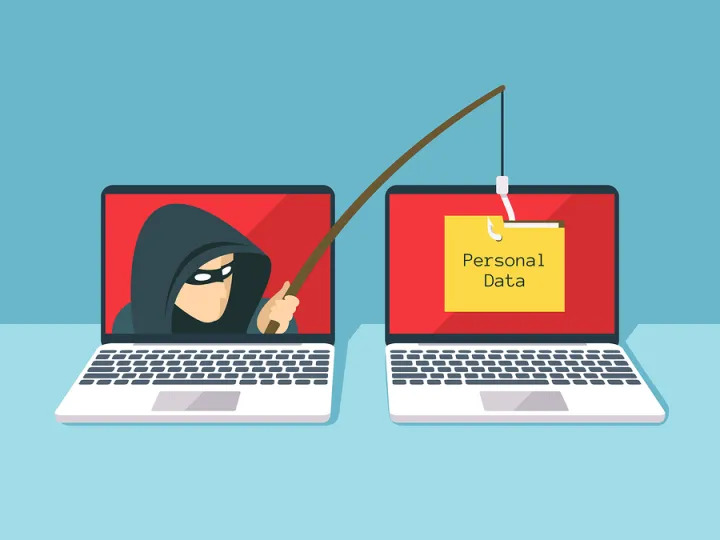
In our modern digital landscape, where technology seamlessly intertwines with our daily routines, the specter of cyberattacks looms ominously. Among the myriad threats online, phishing emerges as a particularly pervasive and treacherous danger. Just as a fisherman casts his net, cybercriminals deploy digital bait, aiming to ensnare unsuspecting prey. This week, we delve into the realm of phishing, examining its diverse forms and offering strategies for safeguarding against them.

At its core, phishing involves duping individuals into revealing sensitive information by posing as trustworthy entities, often via email, text, or phone calls. However, as cybersecurity defenses evolve, so too do the tactics of cyber adversaries. Enter smishing and vishing.

Steps for Protect Yourself from Phishing Scams:

Protecting yourself from phishing scams involves several proactive steps to mitigate the risks effectively. Here’s a concise guide:

  1. Stay Informed: Educate yourself and your team about the various forms of phishing attacks, including email, text (smishing), and voice (vishing) scams. Awareness is the first line of defense.

  2. Scrutinize Messages: Be skeptical of unsolicited communications, especially those urging immediate action or requesting sensitive information. Look for signs of phishing, such as generic greetings, spelling errors, or suspicious URLs.

  3. Verify Sender Authenticity: Before clicking on links or responding to messages, verify the sender’s authenticity. Use official contact channels to confirm the legitimacy of requests, particularly if they involve financial or personal information.

  4. Exercise Caution with Links and Attachments: Avoid clicking on links or downloading attachments from unknown or suspicious sources. Hover over links to preview the URL destination and verify its legitimacy before proceeding.

  5. Use Robust Security Software: Install reputable antivirus and anti-phishing software to detect and block malicious activities. Keep your security software updated to defend against emerging threats effectively.

  6. Keep Systems Updated: Regularly update your operating system, applications, and browser to patch security vulnerabilities. Cyber-criminals often exploit outdated software to launch phishing attacks.

  7. Enable Two-Factor Authentication (2FA): Implement 2FA wherever possible to add an extra layer of security to your accounts. Even if cyber-criminals obtain your login credentials, 2FA can prevent unauthorized access.

  8. Report Suspicious Activity: If you encounter a potential phishing attempt, report it to the appropriate authorities, such as your IT department, email service provider, or relevant cybersecurity agencies.

  9. Educate Others: Share your knowledge about phishing scams with friends, family, and colleagues. Encourage them to adopt best practices for online security and remain vigilant against potential threats.

By following these steps and remaining vigilant, you can significantly reduce the risk of falling victim to phishing scams and safeguard your personal and sensitive information online.

Be Sure to Have the Best Up-to-Date Security!


Schedule a Personalized Cybersecurity Audit.

Empower yourself against phishing scams. Your online security is in your hands. Take action now to safeguard your digital life.

Contact Us Now
Categories
Uncategorized

Be Cyber-Safe!

Fact:  A cyber attack happens every 39 seconds, according to the University of Maryland.  The vast majority of these attacks happen to small businesses and individuals.

Fact:  If you use the internet with your phone, laptop, or any other device, you are at risk!

Fact:  Most cyber-attacks happen EVEN THOUGH anti-virus software is installed!

Cyber attacks come in many different variations:

  • Social media account hacks or blocking attempts
  • Computer viruses
  • Computer ransomware
  • Phishing – you receive an email or a message to “click here”
  • Social media account hacks or blocking attempts
  • Computer viruses
  • Computer ransomware
  • Phishing – you receive an email or a message to “click here”
  • Vishing – you receive a voice mail or call asking for personal information or telling you to visit a website
  • Denial of service attacks on websites or networks
  • Identity theft
  • And more…

So, what can you do to protect yourself from cyber threats?  While no one is completely safe, there are some preventative measures that reduce your risk substantially.  Here are some quick tips to use:
    1. Change your passwords regularly! Come up with your own unique password formula and frequency.  Use it regularly – at the very least once a year but the more frequent, the better.


    1. Watch for Phishing and Vishing – cyber criminals are getting even more clever in their approaches and can “mimic” actual people you know. So ALWAYS check the link carefully before you click the link.


    1. Use RELIABLE anti-virus software – The most common products that come with most systems today do a very poor job at blocking cyber-attacks – that’s why the software is so cheap. Instead, look for MANAGED anti-virus & security solutions, like what Click IT offers!


    1. Keep a good backup – just putting files on your computer or cell phone are not good enough. OneDrive or Google Drive are not safe and are easily hacked.  Use a reliable managed backup solution, like what Click IT offers!


Be sure to teach your children to be cyber-safe also and go over these tips with them regularly!

For more tips and help, please contact us at Click IT – we are here to help you!  Be Cyber-Safe!


Categories
Uncategorized

Spring Cleaning Your Computers

Spring is in the air, and everyone is doing home improvement projects, gardening, and cleaning up the inside and outside of their homes and offices.

Did you know you should do cleaning of your computers and cell phones, too?

  1. Clean the outside of the device – use a safe alcohol wipe to clean the screen, keyboard, and fan area. DO NOT spray directly onto the device, because the moisture could get into circuitry and cause damage. Instead, use a chamois cloth or lint-free wipe.  Using pure alcohol wipes is the safest approach, but if you use glass cleaner make sure it evaporates quickly.
  2. Clean the inside of the device – for this we recommend having a professional handle this to make sure your system is kept as safe as possible while the dirt and dust is removed. The cleaning includes gently cleaning the ports, plugs and drives. Depending on how much dirt or dust is present, the professional may need to remove the cover and “blow out” the debris safely, plus inspect the fan and circuit connections.
  3. Printers need love, too – schedule a “deep cleaning” of your printer at your local IT store. This makes sure the print heads are cleaned, cartridges are fresh, and nothing is blocking the print or paper feed mechanisms.
  4. Digi-clean also – you may want to put some of those old files and photos on other storage devices (or the cloud) to free up space on your hard drive. You might look at the apps loaded on your laptop or cell phone and remove the ones that are no longer useful. Plus – having a professional run a diagnostic can determine if you need to defrag your disks or do any tuning to speed up your system so it runs smoothly.
  5. Back it up – if you haven’t checked your backup to confirm it is working properly, spring is the perfect time to do that! Need help to check your backup? Check with your local IT professionals!
  6. Patch it up – make sure all your software patches are up to date. You can work with a professional to check everything for you.

Click IT of Marietta is here for all your spring IT cleaning needs!  We provide computer sales, services, repairs for desktops, laptops, and tablets.  We also help with wearable tech, wi-fi, printers, and AI device setup or repair.  PLUS we do networks, cyber security, data recovery, website development, and SO MUCH MORE.

Think of Click IT of Marietta as YOUR LOCAL IT DEPARTMENT.  We are here to help you!  Give us a try!  Reach out via email to [email protected] or phone at 678-202-4600 or social media including Facebook, Twitter, LinkedIn, or Yelp!

Mention this blog post and get a FREE diagnostic and check up!

Stay clean!

Categories
Uncategorized

Your email is being tracked – learn the secret advertisers don’t want you to know

It’s impossible not to be tracked online. Still, you can take steps that make a difference.

If you don’t like the idea of advertisers knowing everything about you, shut them out. Tap or click here for simple, actionable steps you can take now.

Unlike your browser history, you probably don’t give much thought to handing out your phone number. It’s time to change that. Tap or click for methods to protect your number and stop inviting spam.

When it comes to your email, you may not realize there’s an easy way advertisers, marketers, companies, and even scammers track you – with just one tiny pixel.

What is pixel tracking?

You can’t see them, but pixel trackers are hidden in many of the emails you receive. Technically, this microscopic pixel is computer code embedded within the body of an email, generally hidden within an image.

Typically, pixel-tracking allows marketers, advertisers, and companies to collect data about you, such as:

  • The number of times you open an email
  • The operating system you use
  • The time you opened the email
  • Your IP address can give an idea of your location
  • What type of device you use to open the email

Detailed data is sent back to the sender automatically, without you having to click on any links or even respond. That may feel like an invasion of privacy, but it is legal and different from when hackers and scammers employ this tactic.

In that case, it becomes all about monitoring your activity.

A man uses his iPhone and laptop computer at his desk.

A man uses his iPhone and laptop computer at his desk.

Speaking of monitoring, spyware is dangerous software that tracks everything from the sites you visit to the passwords you type in. Tap or click here for six signs your phone has been infected with so-called stalkerware.

How to spot an email scam

Pesky marketing emails are one thing, and we will get into how to stop that. But first, let’s review the red flags you should send an email straight to the trash:

  • There’s a request for personal information.
  • The “From” address and the display name don’t match.
  • The “From” address is very similar to a known business or contact, with one or two characters changed.
  • It requires immediate attention.
  • It is full of poor spelling or grammar. (Often, this feels like something is “off.”)
  • There’s a request to click on a link or download a document or file you did not request.

Most of these clues are easy to spot, but you won’t see a microscopic pixel hidden in an email.

Spot the fake: How to tell if an image you saw on social media is fake

Good news if you have an iPhone, iPad, or Mac

Apple automatically stops senders from retrieving your IP address starting with iOS 15, macOS Monterey and iPadOS 15.

Additionally, email content is downloaded privately when you receive the email, not when you view it. That means only generic data is sent back to marketers, companies, and anyone else tracking you via email.

The Mail Privacy Protection features are not enabled by default. Here’s how to turn them on:

  • On an iPhone or iPad: Go to Settings > Mail > Privacy Protection. Turn on Protect Mail Activity.
  • On a Mac: In the Mail app, choose Mail > Preferences, then click Privacy. Select Protect Mail Activity.

Apple security 101: 7 important iPhone security settings to change right now

A woman expresses surprise while using a laptop computer. 

A woman expresses surprise while using a laptop computer.  (iStock)

What about Gmail, Windows, and Android users?

The simplest way to prevent pixel-tracking is to block images from displaying in your emails. If the pixel isn’t displayed, the code probably won’t work.

  • In Gmail on a computer: Click on the gear icon and select See All Settings. Under General, scroll down and click on Ask before displaying external images under the Images option. Click Save Changes at the bottom of the page.
  • In the Gmail app: Tap the three-line menu in the upper corner > Settings > Choose your account. Scroll down to Images under Data usage. Click it, then choose to Ask before displaying external images.
  • In Yahoo Mail: Click Settings > More Settings > Viewing Email. Scroll to the bottom. Under Show images in messages, choose to Ask before showing external images. The page will refresh and automatically save.
  • In Outlook, click on File > Options > Trusted Center. Choose Trust Center Settings > Automatic Download from the left-hand pane. Select Don’t download pictures automatically in HTML e-mail messages or RSS items. Click OK to save.

Want smart tech tips like this straight to your inbox? Try my free Tech Tips and How-tos newsletter. I’ll help you get the most out of all your gadgets, save money and protect your privacy.

Bonus Tip: How to boost your tax refund this year

The IRS has new changes, including the $600 rule, WFH deductions, child tax credits, and more. In this episode, tax accountant Rachel Cheek and I dive into the many ways deductions, forms, social media, and rules will impact your 2021 tax return.

Check out my podcast “Kim Komando Explains” on Apple, Google Podcasts, Spotify, or your favorite podcast player.

Listen to the podcast here or wherever you get your podcasts. Just search for my last name, “Komando.”

What digital lifestyle questions do you have? Call Kim’s national radio show and tap or click here to find it on your local radio station. You can listen to or watch The Kim Komando Show on your phone, tablet, television, or computer. Or tap or click here for Kim’s free podcasts.

Copyright 2022, WestStar Multimedia Entertainment. All rights reserved. By clicking the shopping links, you’re supporting my research. As an Amazon Associate, I earn a small commission from qualifying purchases. I only recommend products I believe in.

Learn about all the latest technology on The Kim Komando Show, the nation’s largest weekend radio talk show. Kim takes calls and dispenses advice on today’s digital lifestyle, from smartphones and tablets to online privacy and data hacks. For her daily tips, free newsletters, and more, visit her website at Komando.com.

Categories
Uncategorized

Managed IT Services

This video gives you a brief overview of how Click IT can make your life easier by keeping your systems and technology updated and working properly. Contact us for more information!
Categories
Uncategorized

Tech in 2022

Click IT Computers

Lenovo is known as one of the premier laptop providers in the US.  Their systems are highly dependable and durable, with a very low failure rate.  Lenovo stays on top of technology and has keen insights into what is happening and the trends to watch.

Recently, Lenovo released an article on the TechRepublic website about their Top 7 Technology Predictions for 2022.  There are some great points in this article for all of us!

Here are some thoughts on just a couple of Lenovo’s predictions:

  • 5G and Wi-Fi 6 – these two technologies will usher in a flood of new devices from cell phones to tablets, laptops and more. The reason is the new 5G and Wi-Fi 6 technology allows more data to push thru at higher speed AND higher quality.  Watch for all kinds of devices to be introduced with these buzzwords attached!
  • Wearable screens – while the smart watch has been around for awhile now, watch for smart clothing! This can include newer watches, eyewear, gloves, even shoes and shirts!
  • Monitors go main-stream – these aren’t your momma’s monitors! While the trend to see small screens continues, there is now a trend towards big screens and portable screens.  Watch for more folding monitors, lightweight monitors, and super-sized monitors.  Many will have smart tech built in with easy interfaces to phones, tablets, laptops, or AI devices like Alexa or Google.

This is a great article to read if you love learning about cutting edge tech and what the cool kids are up to!  Lenovo definitely has their finger on top trends in tech!

Click IT of Marietta is here to help you with your current tech as well as any new tech!  We provide computer sales, services, repairs for desktops, laptops, and tablets.  We also help with wearable tech, wi-fi, printers, and AI device setup or repair.  PLUS we do networks, antivirus, data recovery, website development, and SO MUCH MORE.

Think of Click IT of Marietta as YOUR LOCAL IT DEPARTMENT.  We are here to help you!  Give us a try!  Reach out via email to [email protected] or phone at 404-458-7221 or social media including Facebook, Twitter, LinkedIn, or Yelp!

Mention this blog post and get 10% off your service request (some restrictions may apply)!

Here’s to a great 2022 for all of us!

Categories
Uncategorized

Windows 7 End of Life:

Windows 7 End of Life
Click IT Group

company will stop supporting Windows 7

Contact Click IT for more Information

If you continue to use Windows 7 after support has ended, your PC will still work, but it may become more vulnerable to security risks and viruses. Your PC will continue to start and run, but Microsoft will no longer provide the support for your business, and therefore, Click IT will not be able to continue to support that computer.

You Must Call To Learn Your Options

16 S. Main Street P.O. Box 2,Chagrin Falls, OH 44022Voice: Local: (440) 247-4998Toll-Free: (800) 368-7416

Categories
Uncategorized

The State of Advertising Computer Repair on Google

Louis Rossmann has made a couple of videos about Google’s continued policy which discriminates against the computer repair industry. Check them out.

🔵 Facebook advertiser protest: https://theweek.com/speedreads/921439… 🔵 What’s happening with Google Adwords & repair: https://www.ifixit.com/News/31131/an-… 🔵 Google’s policy: https://support.google.com/adspolicy/… 🔵 Google’s explanation: https://www.blog.google/products/ads/… 🔵 Inconsistent enforcement of the policy: https://www.youtube.com/watch?v=T1Too…